
MC4 Solar Connector connection guide
MC4 Solar Connector is the name of the connection type on all new solar panels, providing an IP67 waterproof and dust proof safe electrical connection. MC4 Solar Connector will not connect with older MC3 type Connector.
The MC4 Solar Connector work best with 4mm and 6mm solar cable.
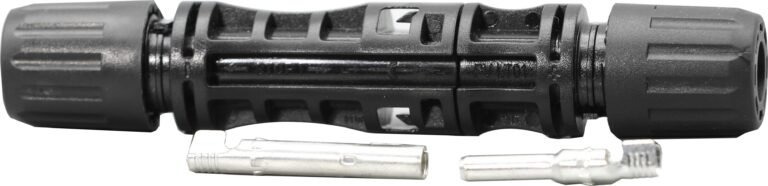
The picture above shows all the parts for the male and female connectors.
All you need is the cable, a male and female MC4 Solar Connector, wire strippers, some wire crimps and about 10 minutes of your time.

You will notice the wire is stripped shorter than the metal crimp connector. There is a mark on the metal to indicate how far the other connector will enter into this one, if your cable extends past this mark in the connector you will not be able to join the MC4 Solar Connector together.
Recommended cable stripping length is between 10 – 15mm.


We are using a MC4 2.5 – 4 – 6mm crimp solar connector for this because it gives a great connection every time and holds all the bits in place when you crimp.

Pass the screw nut over the metal crimp first
The plastic housing has a non return clip inside and if you have not put the nut on the cable first you will not be able to get the plastic housing off without damaging it rendering it unsafe to use.

When you push the crimped cable into the connector, you will hear a “CLICK”
This is the non return clip locking the crimp into the plastic housing.

Looking closely at the picture you will see that the rubber seal washer is flush with the end of the plastic fingers around the cable.
This will give the best grip on 4mm cable when the nut is tightened onto the plastic housing.
If you do not do this with 4mm cable the connector will be able to spin around the cable and over time may damage the connection.

We put a little bend in the cable for better surface contact inside the crimp.
This cable insulation is stripped by 15mm to expose the wire for crimping.
Crimp the same as the male in step 2.

Again pass the screw nut over the cable first ( step 3 )
Check the rubber washer as in step 5
Then push the crimped cable into the female housing untill you hear the “CLICK”
Tighten the nut onto the female plastic housing.

We would advise you to test the continuity of your cable with the new MC4 Solar Connector on before connecting to your solar panels or charge controller.
This will confirm you have a good connection that will last for years.
Please remember never disconnect the connectors when the sun is on your solar panels or they are connected to a battery, you may be injured by your free green electricity.
Stay safe and thank you for looking at our MC4 solar connector connection guide.